Tame your tab chaos with
OranguTab
The intelligent tab manager that organizes your browsing sessions effortlessly. Save resources, stay focused, and never lose a link again.
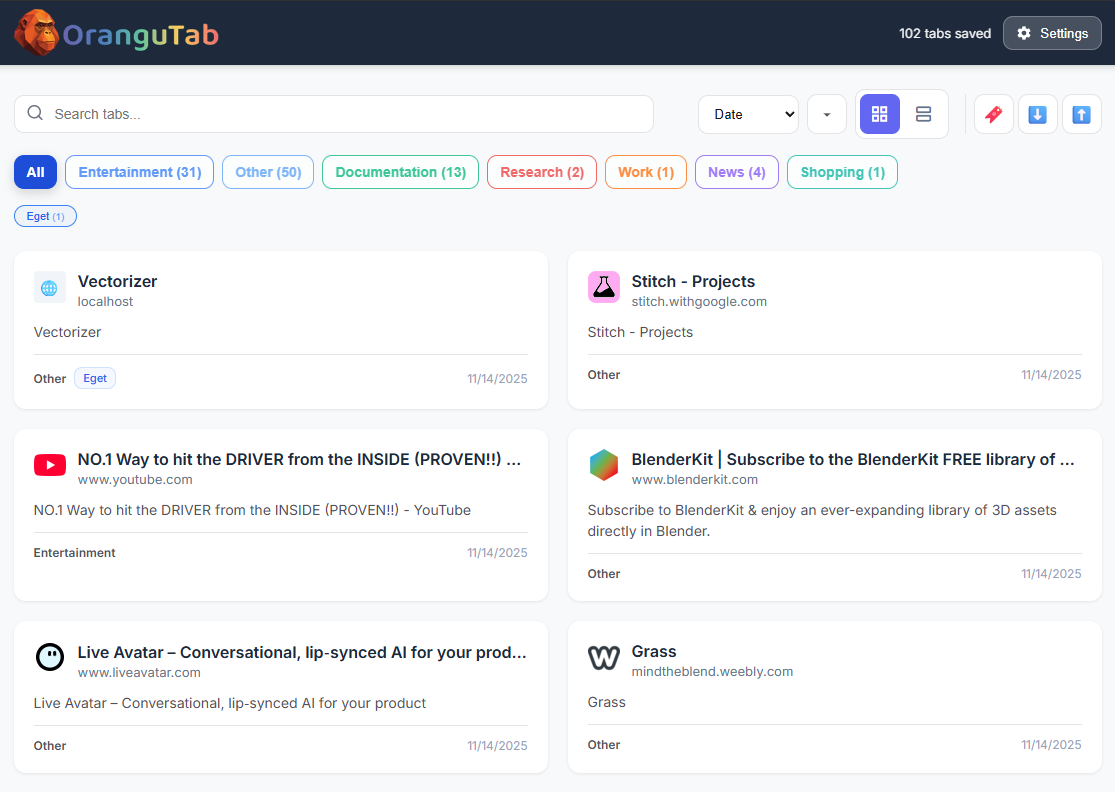
The Dashboard View: Access your saved sessions instantly with smart categorization.
Everything you need to stay organized
Designed for calm control over tab chaos, without slowing you down.
OranguTab is a browser extension that helps users capture, organize, and restore browsing sessions. It allows saving tab groups, smart categorization, and fast search so users can revisit workspaces without losing context.
All features are designed with user privacy in mind — tab data stays local unless explicitly exported by the user.
Save Sessions
Capture a full workspace and return to it anytime with persistent session management.
Smart Groups
Organize tabs by topic, project, or domain automatically using intelligent grouping.
Fast Search
Find any tab across all your saved sessions instantly with our lightning-fast search.
One-click Restore
Bring back a saved session exactly as it was, including tab order and pin status.
Cross-window
Manage and migrate tabs across multiple browser windows seamlessly.
Privacy-first
Your data stays on your device. No accounts, no tracking, no server-side storage.
Lifetime access for OranguTab
Pay once, keep it forever.
Lifetime Access
Pay once, keep it forever.
- Unlimited tab sessions and groups
- AI-assisted categorization (fair use)
- Free updates for at least 1 year
- Instant license key delivery
- Email support
Fair-use AI limits apply.
OranguTab is a Chrome extension that helps people organize and save browser tabs into sessions and groups, so they can quickly restore their workspace and stay focused. Customers discover OranguTab through the website and the Chrome Web Store, and they pay a one-time fee to unlock Pro features via a license key.
Answers before you buy
Everything you need to know about OranguTab.
Privacy & Data Handling
OranguTab does not sell or share user data. All browsing session information is stored locally within the browser unless the user explicitly exports it.
What happens if I reinstall Chrome?
You can reactivate using the same license key. Sessions are stored locally, so export first if you are reinstalling.
Can I export sessions?
Yes. Export sessions to a file for backup or sharing, then import when you need them.
How does licensing work?
After purchase, you receive a license key by email. Enter it inside OranguTab to unlock Pro features.
Does it work across devices?
Sessions live in the browser, so each device has its own workspace. Use export and import to move sessions.